Introduction to Web Scrapping in Python with BeautifulSoup

Software Engineer | Tech Writer
Web Scrapping, also known as screen scraping, data mining,or web harvesting is not new and has existed for a long time now. This article focuses on how to use python to request information from a web server, how to perform basic handling of the server’s response, and how to begin interacting with a website in an automated fashion. To be honest, web scraping is an excellent industry to enter if you want a high return on a small initial investment.
Prerequisites
Python 3 installed
What is Web Scraping?
Web scraping is the process of collecting and parsing raw data from the Web
## Why Web Scraping? web scrapers can go places that traditional search engines cannot
Introduction to BeautifulSoup
Beautiful Soup is a Python library for pulling data out of HTML and XML files. It works with your favorite parser to provide idiomatic ways of navigating, searching, and modifying the parse tree.
BeautifulSoup helps format and organize the messy web by fixing bad HTML and presenting us with easily traversable Python objects representing XML structures.
Installing BeautifulSoup
We will be using the BeautifulSoup 4 library (also known as BS4) throughout this article. Check on the complete installation here For linux users:
$ sudo apt-get install python-bs4
To install using the pip package
$ pip install beautifulsoup4
To check for installation, open for the python terminal and import beautifulsoup.
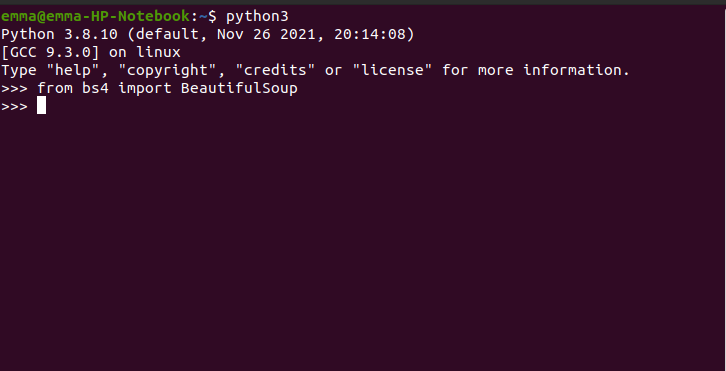
If the import completes without error, Voila🎉🎉, you have beautifulsoup installed successfully.
Note 🔖: If you install any python library without a virtual environment, you are installing it globally. It is recommended to install python libraries via virtual enviroment to avoid potential conflicts between installed libraries, also it helps to easily bundle projects with associated libraries when working with multiple python projects.
- To do this, install virtual environment
pip3 install virtualenv
- Create a virtualenvironment Linux/mac
python3 -m venv env
Windows
py -m venv env
- This creates a new environment called env, which you must activate to use: Linux/MacOs
source env/bin/activate
Windows
.\env\Scripts\activate
- After you have activated the environment, you can now install your library, in our case beautifulsoup
(env)emma$ pip install beautifulsoup4
(env)emma$ python
> from bs4 import BeautifulSoup
>
- You can leave the environment with the deactivate command, after which you can no longer access any libraries that were installed inside the virtual environment:
(env)emma$ deactivate
emma$ python
> from bs4 import BeautifulSoup
Traceback (most recent call last):
File "<stdin>", line 1, in <module
Running BeautifulSoup
The beautifulsoup object is the most commonly used object in the beautifulsoup library, so we have to import it when running BeautifulSoup in our project.
scrapy.py
from urllib.request import urlopen
from bs4 import BeautifulSoup

html = urlopen('http://www.pythonscraping.com/pages/page1.html')
bs = BeautifulSoup(html.read(), 'html.parser')
print(bs.h1)
Output
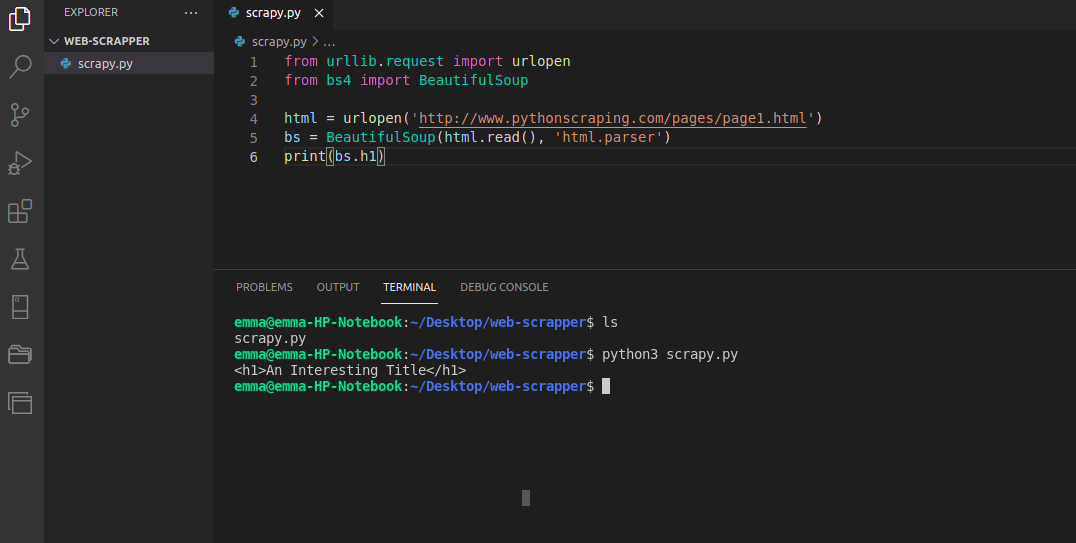
Explanation
We are importing the urlopen function and calling html.read() in order to get the HTML content of the page.
When you create a BeautifulSoup object, two arguments are passed in:
bs = BeautifulSoup(html.read(), 'html.parser')
The first is the HTML text the object is based on, and the second specifies the parser that you want BeautifulSoup to use in order to create that object. NB: html.parser is a parser that is included with Python 3 and requires no extra installa‐ tions in order to use.
Tip💡: lxml is another example of a popular parser that has some advantage over the html parser.
bs = BeautifulSoup(html.read(), 'lxml')
- It is generally better at parsing “messy” or malformed HTML code.
- It is forgiving and fixes problems like unclosed tags, tags that are improperly nested, and missing head or body tags.
- It is also some‐what faster than html.parser , although speed is not necessarily an advantage in web scraping, given that the speed of the network itself will almost always be your largest bottleneck. However, you have to install lxml first o use it. It depends on third-party C libraries to function which can cause problems for portability and ease of use, compared to html.parser.
Another example of parser include html5lib
bs = BeautifulSoup(html.read(), 'html5lib')
Conecting Reliably and Handling Exceptions
It is a good practice to always provide a way of handling errors and exception while doing we scraping. You can handle this exception in the following way:
from urllib.request import urlopen
from urllib.error import HTTPError
from urllib.error import URLError

try:
html = urlopen('https://pythonscrapingthisurldoesnotexist.com')
except HTTPError as e:
print(e)
except URLError as e:
print('The server could not be found!')
else:
print('It Worked!')
• If the page is not found on the server (or there was an error in retrieving it), urlopen will throw an HTTPError, the program now prints the error, and does not execute the rest of the program under the else statement • If the server is not found at all, the site is down, or the URL is mistyped), urlopen will throw an URLError and prints the error.
Conclusion
I hope you enjoyed the article. Next i will be handling "Advanced HTML Parsing", where we will be looking at parsing complicated HTML pages in order to extract only the information we are looking for.
Thanks for reading, i would appreciate any feedback or comment.